
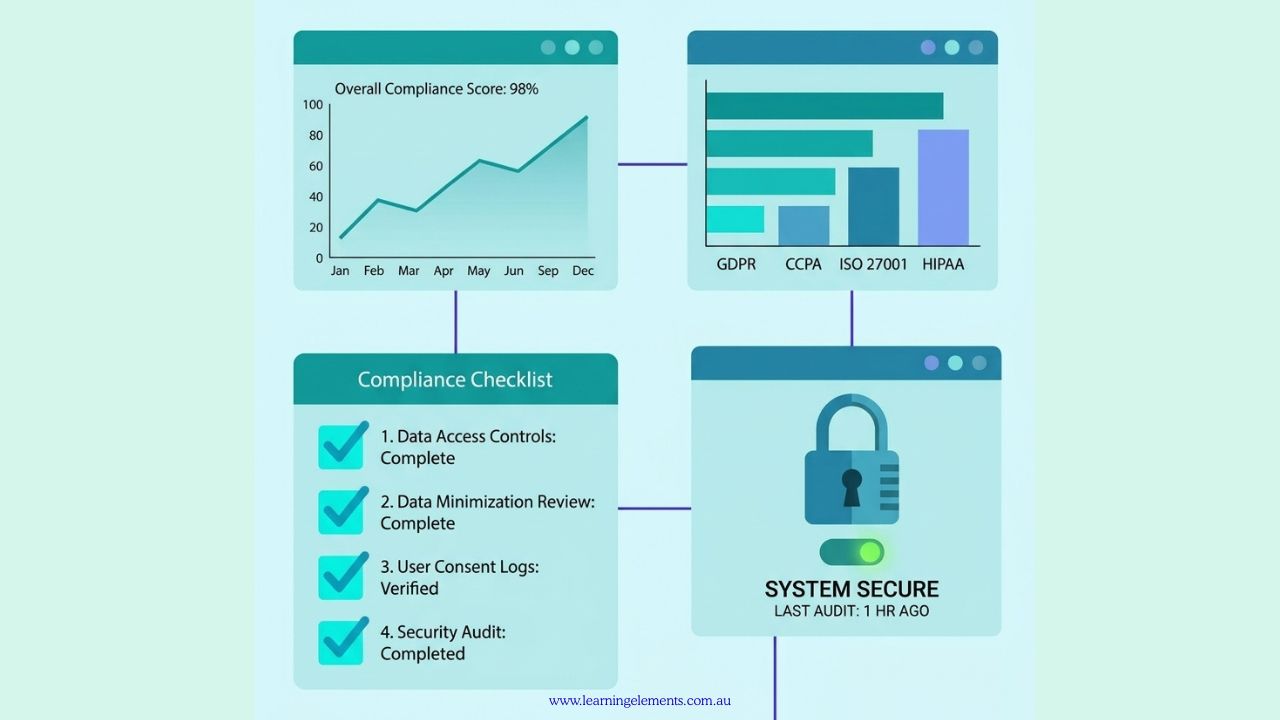
To set up training reporting for compliance audits, you need a centralised training register, standardised evidence for every completed session, automated expiry tracking, role-based training matrices, and audit-ready export reports. Australian businesses may manage training reporting using a dedicated Learning Management System (LMS), HR or workforce management system, structured spreadsheet, or a combination of systems, depending on their size, industry and compliance requirements.
Why Training Reporting Matters for Australian Compliance Audits
Australian regulators and certification bodies may expect documented proof of training, not just a policy stating training “should” occur. Whether you’re being audited under work health and safety (WHS) law, an ISO management system, or the 2025 Standards for Registered Training Organisations (RTOs), you may need to provide documented evidence that required training, competence or other compliance activities have been completed.
Common Australian audit triggers include:
- WHS regulator audits or investigations (SafeWork NSW, WorkSafe Victoria, WorkSafe Qld, and equivalents in other states/territories), particularly after an incident or notifiable event.
- ISO 9001, ISO 45001, or ISO 27001 surveillance audits, where competence requirements may require organisations to retain appropriate documented information as evidence of competence.
- ASQA regulatory activity for Registered Training Organisations, where evidence relating to trainer and assessor credentials, industry currency and professional development may be reviewed against the applicable 2025 Standards for RTOs.
- Fair Work Ombudsman compliance audits and investigations, particularly where employment records, pay and compliance with workplace laws are being assessed.
- Industry-specific licensing, certification and competency requirements, including construction induction requirements, RSA/RSG requirements, Chain of Responsibility obligations in heavy vehicle transport, and Food Safety Supervisor requirements where applicable.
- Client or tender due diligence audits, common in construction, healthcare, and government contracting supply chains.
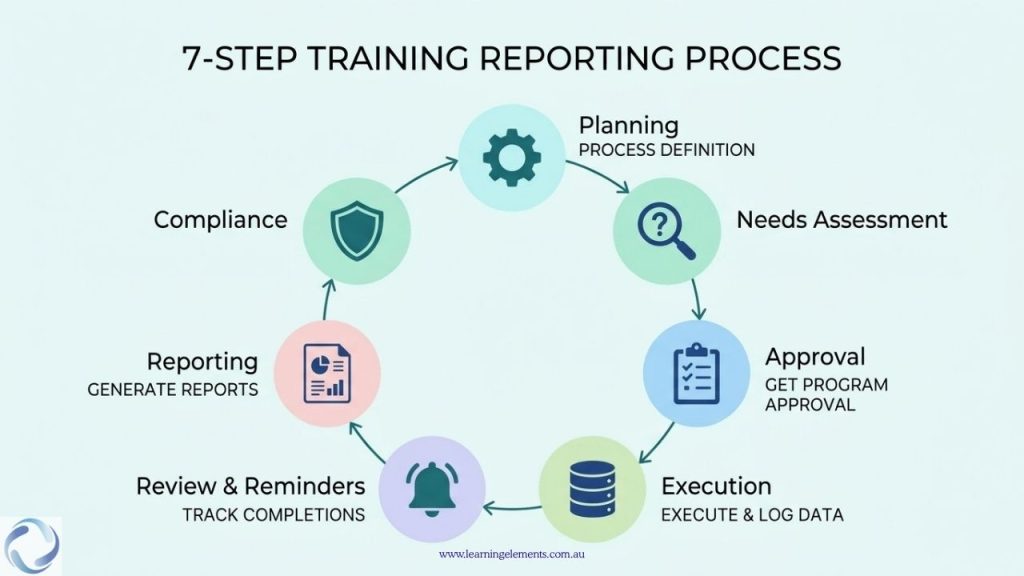
The 7-Step Process
- Map compliance requirements to specific roles and training types.
- Choose a system of record (LMS, HRIS, or structured spreadsheet).
- Standardise your data fields (who, what, when, evidence, expiry).
- Build a training matrix showing required vs completed training per role.
- Automate expiry and renewal alerts.
- Generate audit-ready reports in advance, not on request.
- Run a mock audit quarterly to catch gaps before a regulator does.
Step 1: Map Compliance Requirements to Roles
Before building any report, define what training is mandatory for which role, and under which regulation or standard. This becomes your compliance obligations register.
For each role, capture:
- Mandatory training type (e.g. manual handling, White Card, food safety, harassment prevention)
- Legal or standards basis (e.g. applicable WHS legislation, ISO 45001 clause 7.2, or the applicable 2025 Standards for RTOs)
- Renewal frequency (once-off, annual, 2-yearly, 3-yearly)
- Evidence required (certificate, assessment result, sign-in sheet, competency checklist)
Tip for Australian businesses: State and territory WHS requirements do not always prescribe a fixed refresher period for general workplace training. Training and certification requirements can vary depending on the activity, qualification and applicable jurisdiction. Always check the current requirement with the relevant regulator or recognised training provider.
Step 2: Choose Your System of Record
You have three realistic options, depending on business size:
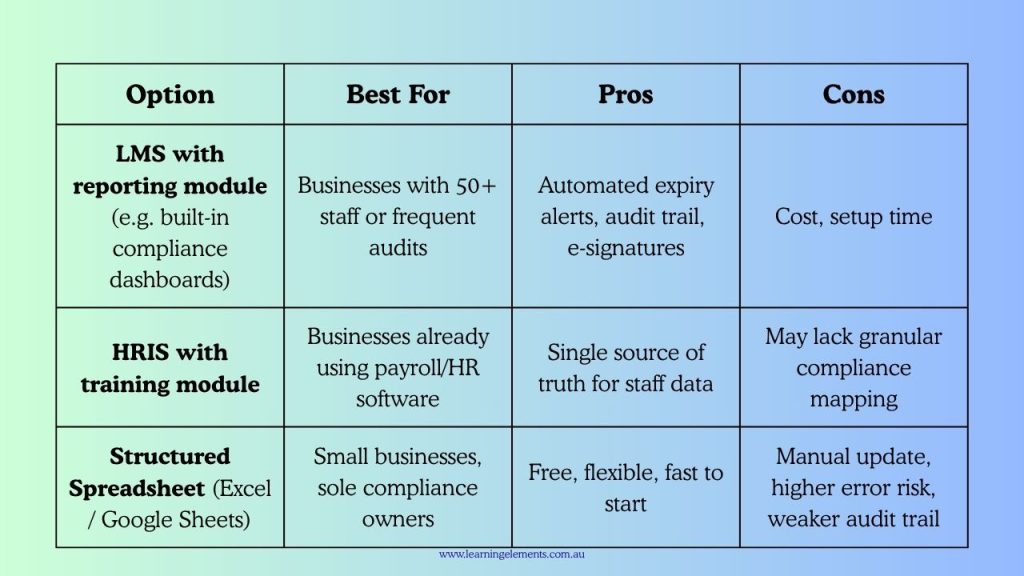
Whichever you choose, the system should be able to produce a point-in-time export supported by the underlying training records and evidence, rather than relying solely on a live dashboard that may change over time.
Step 3: Standardise Your Data Fields
Every training record should capture consistent core fields appropriate to the type of training. This consistency makes training records easier to review, compare and provide as supporting evidence during an audit.
Recommended core fields:
- Employee name and ID
- Role/position
- Training course name and version
- Delivery method (in-person, online, on-the-job)
- Trainer/provider name and (where relevant) RTO code
- Date completed
- Assessment/competency result
- Certificate or evidence file reference
- Expiry date (if applicable)
- Renewal status (current, due soon, overdue)
Store evidence files (certificates, assessment records) in a consistent, searchable folder or LMS structure, ideally named using a standard pattern.
Step 4: Build a Training Compliance Matrix
A training matrix can provide a clear way to compare role-based training requirements with completed training and identify gaps. It’s a simple grid: roles down one side, required training across the top, with colour-coded status in each cell (complete, due soon, overdue, not required). For an auditor, a training matrix can offer a quick, visual snapshot of where training obligations are being met and where attention may be needed, without requiring them to review each individual employee record in detail. Many organisations maintain the matrix as a live dashboard within an LMS or HR system, while others keep it as a regularly updated spreadsheet linked to individual training records and evidence files. Reviewing and updating the matrix on a set schedule, such as monthly or ahead of a scheduled audit, can help ensure it continues to reflect current training status rather than becoming outdated.
Step 5: Automate Expiry and Renewal Tracking
Manual tracking can increase the risk of missed renewals, inconsistent records and delayed follow-up, particularly when training records are maintained across multiple locations or systems.
As an internal management approach, organisations could set automated alerts at:
- 90 days before expiry — plan renewal training
- 30 days before expiry — book the session
- When a required credential is no longer valid or a required training condition has not been met — flag the record for action and, where applicable, restrict the employee from the relevant task or site until the requirement is met.
Many LMS platforms and some HRIS tools support this type of tracking natively. If using a spreadsheet, conditional formatting plus a recurring calendar reminder is a workable minimum.
Step 6: Generate Audit-Ready Reports in Advance
Don’t wait for an audit notice to build your reports. Prepare standing report templates that can be exported on demand:
- Training compliance summary — % compliant by department/site
- Individual employee training history — full record for any single staff member
- Overdue/expiring training report — for management follow-up
- Trainer/assessor currency report — for RTOs specifically
- Evidence index — a table linking each completed course to its certificate file location
Having these reports ready can help demonstrate that training and compliance activities are being monitored and managed as part of an ongoing process.
Step 7: Run a Mock Audit Quarterly
Every quarter, pick 5–10 employee records at random and check:
- Is the required training correctly identified for their role?
- Is there a certificate or evidence file for every completed item?
- Are expiry dates accurate and up to date?
- Does the record provide the evidence an external auditor may reasonably need to review the training requirement and its completion?
RELATED READ: Where to Find Training Reporting Tools with Compliance Tracking
Need a more structured approach to training reporting?
Training reporting should make it easier to see what is required, what has been completed and where gaps remain. Learning Elements can help organisations review their training needs and develop practical training and reporting approaches that suit their workforce and delivery requirements.
Discuss Your Training Requirements
Common Mistakes in Australian Compliance Training Reporting
- Relying on attendance records alone where the applicable training or competency requirement also requires evidence of knowledge or skills.
- Tracking training in multiple disconnected spreadsheets across sites or departments.
- No process for managing relevant training, induction and competency information for contractors and labour-hire workers where WHS responsibilities apply.
- Confusing attendance with competency where the applicable framework requires competence to be demonstrated.
- No version control for training content where the training covers controlled policies, procedures or work instructions, making it difficult to establish which version was provided.
RELATED READ: Version Control in Training Design: Best Practices, Strategies, Tools, and What’s Next
How Learning Elements Can Help
Learning Elements can help organisations design and develop training around their workforce requirements, including training needs analysis, role-based training requirements, learning content and delivery approaches.
We can help you structure training so that requirements, participation, completion and relevant evidence are easier to manage and report. Training can be designed for virtual, face-to-face, instructor-led, blended or self-paced delivery.
Conclusion
Effective training reporting is not simply about producing a report when an audit is announced. It is about maintaining accurate information on required training, completed training and supporting evidence as part of normal workforce management.
The specific training, evidence and record-keeping requirements depend on the legislation, standards, industry requirements and training activities that apply to your organisation. A structured training register, role-based requirements, appropriate evidence and regular reviews can make it easier to identify gaps and provide relevant records when required.
Sources:
- Australian Government – Australian Skills Quality Authority (ASQA): 2025 Standards for RTOs
- International Organization for Standardization: Guidance on the requirements for Documented Information of ISO 9001:2015
- Australian Government – Australian Skills Quality Authority (ASQA): Practice Guide – Trainer and assessor competencies
- Safe Work Australia: Provide ongoing training and supervision