
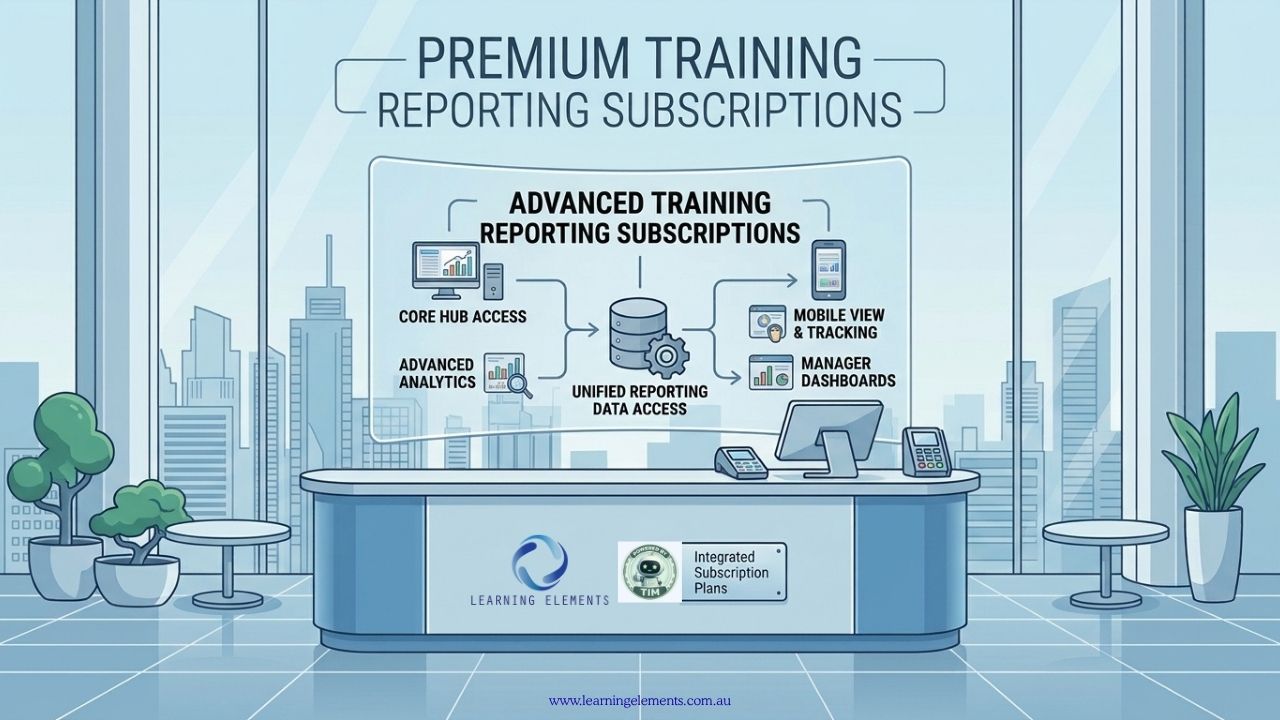
Choosing the right subscription plans for advanced training reporting becomes increasingly important as an organisation grows its workforce, course catalogue, locations and learning programmes. Spreadsheets may be sufficient for basic record-keeping, but larger training operations often require automated data collection, detailed reports, dashboards and analytics.
Training reporting software can help organisations manage this information more efficiently. A learning management system (LMS), training management system (TMS) or learning analytics platform can collect training data, monitor learner progress and provide reports to managers and decision-makers. The right system depends on whether the organisation needs to track online courses, manage instructor-led training, monitor compliance or analyse learning outcomes.
For Australian businesses, subscription options range from software purchased directly from vendors to corporate training packages and specialist reporting platforms. Before choosing a provider, it is important to understand what each service offers and whether it meets your reporting requirements.
What Should an Advanced Training Reporting Tool Provide?
The right reporting platform depends on what an organisation needs to measure. Basic systems may cover course completion and attendance, while more advanced platforms can support customised reports, automated notifications and analysis across departments.
Common features include:
- Course completion reporting
- Attendance tracking
- Assessment results
- Certification and expiry tracking
- Learner progress monitoring
- Training hours and participation rates
- Custom dashboards
- Scheduled reports
- Data exports
- Role-based reporting and permissions
- Learning analytics
- Integration with HR systems
Some platforms also connect training data with information from HR, finance or other business systems. This can reduce duplicate data entry and help organisations compare training activity with workforce requirements and business performance.
However, not every subscription includes all these features. Some vendors reserve advanced analytics, integrations and customised reporting for higher-priced plans. Check the features included in each subscription before committing to a contract.
Where Can Organisations Buy Subscription Plans for Advanced Training Reporting Software?
Australian businesses can purchase training reporting subscriptions directly from software providers or use software comparison directories to assess available options. The following providers serve different needs, so they should not be treated as interchangeable.
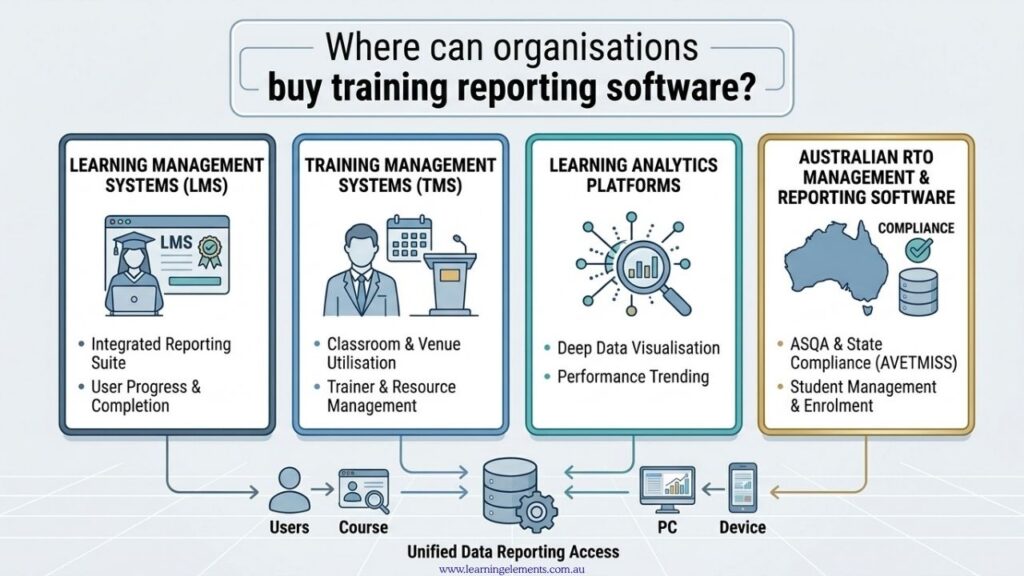
1. Learning Management Systems
An LMS is suitable for organisations that deliver and track online, blended or compliance training. It can bring course content, learner records, assessment results and completion data together in one system.
Examples include LearnUpon, Docebo, 360Learning, TalentLMS and Litmos. Their reporting capabilities, subscription arrangements and integration options vary, so businesses should compare the available features and user limits before choosing a provider.
Australian organisations may also consider providers with a local presence or services designed for the Australian market:
Tribal Habits provides a learning management system with compliance reporting capabilities. Its published technical information states that the platform is hosted on Amazon Web Services in Sydney, Australia, and that customer data is stored on AWS servers and databases located in Sydney, subject to certain secure integrations. This may be relevant to organisations reviewing data residency requirements. Confirm the applicable subscription features, data handling arrangements and contractual terms directly with the vendor.
ELMO Software offers a learning management system for organisations in Australia and New Zealand. Its features include live dashboards, training matrices, exportable reports and scheduled reporting for managers and leaders. These functions may suit businesses that need to monitor mandatory training, course completion and certification expiry dates.
Subscription prices may depend on the number of active users, administrators, courses, features or the level of support required. Some providers publish prices online, while others prepare quotations based on organisational needs.
2. Training Management Systems
A training management system (TMS) may be a better fit for organisations that coordinate instructor-led training, trainers, classrooms, schedules, resources and administrative tasks.
Unlike an LMS focused primarily on delivering and tracking learning, a TMS can support the operational side of training. Depending on the product, this may include course scheduling, trainer utilisation, attendance records, training costs and management reports.
Training Orchestra is one example of a platform focused on training operations management. Organisations considering this type of software should confirm whether its reporting functions cover the measures they need, particularly if they manage both classroom and online training.
A TMS may be useful for businesses with multiple training locations, recurring workshops or complex scheduling requirements. However, smaller organisations with straightforward online training needs may find that an LMS already provides sufficient reporting.
3. Learning Analytics Platforms
Learning analytics platforms focus on analysing learning data rather than simply recording course activity. Depending on the system, they can help identify participation patterns, differences in learner progress, assessment trends and areas where additional training may be required.
Some organisations can obtain these insights through the analytics features of their existing LMS. Others may need a separate reporting or business intelligence tool that combines data from multiple systems.
Before purchasing a separate platform, check whether your current LMS supports report customisation, data exports or integrations with external analytics tools. This may avoid paying for a second system that duplicates existing functions.
4. Australian RTO Management and Reporting Software
Registered Training Organisations (RTOs) have different requirements from businesses that only need to monitor internal employee training. They may need student administration, enrolment records, attendance, qualifications, regulatory reporting and, where applicable, funding information.
SELMA SIS offers student information and RTO management software in Australia. Its published subscription plans include a Report Builder for creating reports, with plan options varying according to student numbers and other included features. The provider also lists features such as AVETMISS support and USI integration. Check the current pricing and plan inclusions directly with SELMA before purchasing.
This type of software is worth considering when training administration and student records are central to the organisation’s operations. A standard corporate LMS may not provide all the functions an RTO requires.
Review your training reporting requirements
Not sure which reporting features your organisation needs? Learning Elements can help assess your current reporting processes, identify information gaps and determine which functions should be included when comparing training software.
Where to Buy Corporate Training Subscriptions
Not every organisation looking for training reporting software actually needs a new reporting platform. Some may primarily need access to ongoing staff training, while others require a system to record and analyse learning activity.
The following providers offer corporate training arrangements rather than serving as direct substitutes for an advanced training reporting platform.
Aptitude Management offers corporate training subscriptions that allow organisations to enrol team members in leadership, management, supervision and other professional development programmes. Training can be delivered virtually or face-to-face. Businesses can request subscription information through its corporate subscription page.
Australian Institute of Management (AIM) provides corporate training packages through its partner pricing arrangements. Organisations can purchase training bundles for employee development and workforce capability building. Its partner pricing page outlines the available packages and terms.
These services may suit businesses that want a structured way to purchase training for employees. However, organisations should confirm what reporting or learner record information is provided rather than assuming that a corporate training subscription includes a full LMS or advanced analytics dashboard.
Business Reporting Tools That May Support Training Analysis
Some organisations need to connect training information with financial or operational performance. In these cases, a business reporting platform may be useful alongside an LMS, although it will not necessarily manage courses, attendance or learner records itself.
Spotlight Reporting provides reporting, forecasting and dashboard tools for business owners, finance teams and advisers. It offers business and adviser pricing plans, with plan details and trial options available on its website page.
A business reporting tool may help an organisation examine financial or operational measures alongside training expenditure and other business data. However, confirm how the relevant data would be imported or connected, as well as whether the platform can produce the specific analysis required.
For example, an organisation might use an LMS to track course completion and a separate business intelligence tool to compare training participation with sales results, productivity or quality measures. This arrangement depends on the availability and quality of the data from each system.
How to Compare Subscription Plans and Providers
Before choosing a provider, identify the reporting problems you need to solve. A long list of features does not automatically mean a platform is suitable for your organisation.
Use the following questions to compare shortlisted products:
- Can the system report on mandatory training and course completion?
- Can it track certifications, expiry dates and assessment results?
- Can managers view reports for their own teams without accessing all employee records?
- Can reports be scheduled or sent automatically?
- Can you export data into a spreadsheet or business intelligence platform?
- Does the software integrate with your existing HRIS, payroll or other systems?
- Are advanced reports included in the proposed subscription?
- Can the system accommodate your expected number of employees and courses?
- Does the vendor provide suitable support, documentation and onboarding?
- Can the provider explain its data storage, security and access controls?
Ask vendors to demonstrate these functions using realistic examples from your organisation. This makes it easier to compare products based on practical requirements rather than sales presentations.
Small to medium-sized businesses may have different reporting requirements and budgets from larger organisations. They may need essential features such as course completion records, attendance tracking and compliance reports without paying for advanced analytics they will not use. For more information about suitable providers and options, read our related article: Who Supplies Training Reporting Tools Tailored for Small to Medium-Sized Businesses?
Choose a training reporting solution that fits your business
Before committing to a subscription, make sure the platform supports your reporting requirements, workforce size and existing systems. Learning Elements can help you define these requirements and prepare a more focused software comparison.
Discuss Your Software Requirements
Training Reporting Apps Compatible with Mobile Devices
Mobile access is another consideration when comparing training reporting subscriptions, particularly for businesses with remote, field-based or shift-based employees. Check whether employees can complete training through mobile applications and whether managers can access progress reports, assessment results and other relevant information from their devices. For a closer look at available mobile options and their reporting functions, read our related article: Training Reporting Apps Compatible with Mobile Devices.
What Should You Check Before Purchasing?
Do not select a reporting platform based only on the number of dashboards it provides. Start with the questions that managers, HR teams and learning and development professionals need the system to answer.
For example:
- Which employees have completed mandatory training?
- Which certifications are approaching expiry?
- Which teams have low completion rates?
- How many training hours has each department recorded?
- Are assessment results improving over time?
- Which programmes have the highest or lowest participation?
- Can training results be compared with business performance?
- Can reports be generated automatically?
- Can data be exported for further analysis?
The answers will help determine whether your organisation needs standard LMS reporting or a more advanced analytics platform.
If you are unsure which functions are essential, list your current reports and identify the information missing from each one. You can then use that list to assess potential subscriptions and avoid paying for features that do not address your needs.
Testing software before purchasing a subscription can help businesses check whether its reporting features, data exports, user permissions and integrations meet their requirements. For practical advice on what to test before committing to a paid plan, read our related article: Free Trials of Training Reporting Software for Australian Businesses.
Consider the Total Cost
The monthly or annual subscription is only one part of the overall cost. Some systems require additional payments for implementation, data migration, integrations or advanced reporting.
When comparing plans, consider:
- Implementation and setup fees
- Data migration from existing systems
- Integration costs
- Additional administrator or learner accounts
- Premium reporting and analytics features
- API access
- Customer support
- Staff training
- Custom development
- Mobile applications
- Additional storage
- Contract length and renewal conditions
A lower subscription price may not remain the more affordable option once additional features and implementation requirements are included.
Ask for a written quotation that identifies the subscription fee, any additional charges and the features included. It is also worth checking how the price changes as the number of learners or administrators increases.
Check Integration Requirements
A reporting platform is more useful when it can work with the systems already used by the organisation.
Depending on your setup, these may include:
- Human resource information systems (HRIS)
- Payroll systems
- Customer relationship management (CRM) platforms
- Finance and accounting software
- Identity and access management systems
- Webinar platforms
- Assessment tools
- Business intelligence platforms
Ask vendors which integrations are built in and which require APIs, middleware or custom development. Also confirm whether connected data updates automatically, runs on a schedule or must be imported manually.
These details matter when reporting depends on information from several departments. An integration that transfers only basic learner records may not provide the assessment or performance data needed for more detailed analysis.
Australian Businesses Should Also Consider Data Governance
Training records can contain employee details, assessment results, completion histories and other workforce information. Before selecting a platform, review where the data is stored, who can access reports, how permissions are managed and what security controls are available.
Organisations should assess the provider’s contractual terms, privacy arrangements, data retention practices and procedures for handling security incidents. They should also consider their own obligations under applicable privacy and workplace requirements.
Australian data hosting may be an important selection criterion, but it should not be the only one. Confirm the provider’s current arrangements and assess whether they meet your organisation’s specific governance and contractual requirements.
How Learning Elements Can Help
Selecting a training reporting platform is only one part of improving reporting. The reporting structure itself needs to reflect what the organisation is trying to achieve.
Learning Elements can help Australian businesses review their current training reporting processes, identify relevant key performance indicators (KPIs) and structure reporting around learning objectives and business requirements.
This may involve reviewing the information currently collected, identifying gaps in existing reports and determining which measures managers need to make informed decisions. A clear set of reporting requirements can also help businesses assess software vendors and compare subscriptions more consistently.
Need help reviewing your training reporting process? Contact Learning Elements at info@learningelements.com.au to discuss your requirements and identify practical next steps.
Conclusion
There is no single training reporting platform that suits every organisation. The right option depends on training volume, reporting requirements, existing systems, budget and the level of analytics required.
Australian businesses can compare LMS subscriptions, training management systems, learning analytics platforms and specialist RTO software according to their needs. Corporate training subscriptions and business reporting tools may also be relevant, but they serve different purposes and should be assessed accordingly.
Before purchasing a subscription, define the reports you need, confirm which features are included, check integration and data governance requirements, and calculate the total cost. A clear assessment will help your organisation select a system that supports its training and reporting objectives without paying for unnecessary functions.
Need help improving your training reporting?
Talk to Learning Elements about reviewing your reporting processes, identifying suitable KPIs and aligning your training information with business requirements.
Sources:
- LearnUpon: Reporting
- Docebo: Pricing and Plans
- 360Learning: LMS Reports: Reporting Features and Analytics
- TalentLMS: Pricing and Subscription Plans
- Litmos: Plans and Pricing
- Tribal Habits: Security and Data Hosting
- ELMO Software: Products
- LearnWorlds: LMS Analytics and Reporting
- Training Orchestra: TMS Reporting and Analytics
- SELMA SIS: RTO Management Software and Reporting and Analytics
- Aptitude Management: Corporate Subscription
- Australian Institute of Management (AIM Education & Training): Partner Pricing
- Spotlight Reporting: Australian Adviser Pricing