

To automate training reporting effectively, organisations must move beyond manual spreadsheets and fragmented tracking methods and adopt integrated digital systems that capture both attendance and assessment data in real time. Traditional approaches often rely on manual sign in sheets, delayed grading, and disconnected reporting processes, all of which increase the likelihood of errors and limit the usefulness of the data.
For Learning and Development leaders, HR managers, compliance officers, and training providers, the ability to access accurate and timely training data is essential for measuring impact, improving learner outcomes, and maintaining compliance.
Automation transforms this process by streamlining data collection, improving accuracy, and enabling faster decision making. When attendance and assessment data are captured automatically and analysed together, organisations gain a more complete understanding of learner engagement, progress, and overall training effectiveness.
This approach builds on broader automated reporting frameworks and highlights their strategic importance in modern learning and development environments.
Core Benefits of Training Attendance and Assessment Reporting
Automating training attendance and assessment reporting offers several significant advantages for organisations, particularly for Learning and Development teams managing large scale or compliance driven programmes.
-Reduced administrative workload
Manual tracking and report generation consume considerable time and resources, especially in organisations delivering frequent or multi format training. Automation removes repetitive tasks such as encoding attendance, calculating scores, and compiling reports.
For example, instead of manually consolidating attendance sheets from multiple facilitators, an automated system can generate a unified report instantly. This allows L&D professionals to focus on higher value activities such as improving course design, coaching facilitators, and supporting learners.
In many organisations, automation can reduce administrative reporting time from several hours per week to only a few minutes, particularly when attendance tracking, assessment grading, and dashboard generation are integrated into a single system.
-Real time tracking of learner participation
Automated systems provide immediate visibility into who is attending sessions, how long they are engaged, and whether they complete required activities.
This is particularly valuable in hybrid or remote environments where visibility is often limited. For instance, a manager can quickly identify learners who consistently leave sessions early or fail to complete modules, enabling timely follow up.
-Immediate visibility of assessment results
Automated grading tools allow assessments such as quizzes, tests, and knowledge checks to be scored instantly. This not only reduces marking time but also enables rapid feedback.
In practice, this means facilitators can adjust instruction immediately. If a large proportion of learners fail a specific question, it may indicate that the concept needs to be revisited or explained differently.
-Improved compliance and audit readiness
Accurate and time stamped records are essential for compliance, particularly in industries such as healthcare, finance, and manufacturing.
Automation ensures that attendance and assessment data are consistently captured, securely stored, and easily retrievable. This reduces audit preparation time and provides confidence that records are complete and reliable.
Beyond operational efficiency, automated training reporting also plays a critical role in compliance management.
How Automated Reporting Supports Compliance Tracking
For organisations operating in regulated industries, compliance tracking is one of the most valuable benefits of automated training reporting.
Automated systems can track:
- Mandatory training completion rates
- Certification expiry dates
- Assessment pass and fail records
- Attendance verification for required sessions
- Refresher training schedules
For example, healthcare organisations may need to demonstrate that employees completed annual safety or data privacy training. Automated reporting simplifies this process by maintaining accurate digital records that can be accessed immediately during audits or inspections.
Compliance tracking also reduces the risk of missed deadlines by sending automated reminders before certifications expire or mandatory courses become overdue.
This level of visibility helps organisations maintain regulatory standards while reducing administrative burden.
RELATED READ: Where to Find Training Reporting Tools with Compliance Tracking
Choosing the Right Automated Training Reporting Tools
Selecting the right reporting tools is essential for successful automation. Organisations should evaluate platforms based on scalability, integration capabilities, reporting flexibility, and ease of use.
Important features to consider include:
- Real time attendance tracking
- Automated assessment scoring
- Customisable dashboards and reports
- AI powered analytics
- Compliance tracking capabilities
- Integration with HR and learning systems
Organisations should also consider whether the platform supports hybrid and remote learning environments, particularly if training is delivered across multiple locations or formats.
A well configured reporting system should not only automate administrative tasks but also provide actionable insights that improve learning outcomes.
Key Strategies
1. Use LMS Automation Features
Modern Learning Management Systems provide a range of built in automation tools that can significantly simplify reporting processes. However, many organisations only use a fraction of these capabilities.
Key features to activate include:
- Automatic attendance tracking through login data, session participation, and activity completion
- Instant grading for quizzes and structured assessments
- Scheduled report generation delivered to stakeholders at predefined intervals
For example, a compliance training programme can automatically record employee participation, track completion status, and send weekly reports to department heads without manual input.
Want to maximise your LMS capabilities and reduce manual reporting?
2. Integrate Attendance with Assessment Data
Attendance alone does not provide a full picture of learning effectiveness. Similarly, assessment results without context may not reflect true engagement.
By integrating these datasets, organisations can uncover meaningful insights. For example:
- Learners with high attendance but low scores may require additional support
- Learners with low attendance but high scores may prefer self paced learning formats
- Patterns may reveal which delivery methods lead to better outcomes
This integrated approach enables more informed decisions about instructional design, delivery methods, and learner support strategies.
3. Apply AI for Insight Generation
Artificial intelligence can significantly enhance automated reporting by analysing large datasets and identifying patterns that may not be immediately visible to human reviewers.
AI can help identify:
- Learners who are at risk of falling behind based on attendance and performance trends
- Patterns in assessment results that indicate common areas of difficulty
- Trends across departments or cohorts that highlight systemic issues
For example, AI might reveal that learners who miss early sessions are far more likely to disengage completely, prompting organisations to introduce early intervention strategies such as reminders or onboarding support.
A simple prompt for AI analysis might be:
“Analyse attendance and assessment data to identify trends affecting learner performance and recommend possible interventions.”
Interested in using AI to turn your training data into actionable insights?
4. Set Up Trigger-Based Reporting
Trigger based automation allows organisations to move from reactive to proactive management of training programmes.
Automated alerts can be configured to notify relevant stakeholders when:
- A learner misses a scheduled session
- Assessment scores fall below a defined threshold
- Mandatory training deadlines are approaching or overdue
For example, instead of waiting until the end of a course to identify issues, a manager can receive an alert as soon as a learner fails an assessment, enabling immediate intervention.
This improves learner success rates and ensures compliance requirements are consistently met.
Example of Automated Training Reporting in Practice
Consider a manufacturing company delivering mandatory safety training across multiple locations.
Before automation, attendance records were tracked manually, assessment scores were entered into spreadsheets, and compliance reports often took days to prepare.
After implementing an LMS with automated reporting capabilities, the organisation was able to:
- Automatically record learner attendance
- Generate instant assessment results
- Send reminders for overdue certifications
- Provide managers with real time compliance dashboards
As a result, reporting accuracy improved, administrative workload decreased, and the organisation gained faster visibility into compliance risks across departments.
Using Training Reporting Templates for Consistency
Training reporting templates can help organisations standardise how attendance, assessment, and learner progress data are presented across programmes.
Templates are especially useful for:
- Monthly compliance reports
- Executive training summaries
- Learner performance dashboards
- Facilitator attendance tracking
- Assessment outcome reporting
Using standardised templates improves reporting consistency and reduces the time required to prepare updates for stakeholders.
For example, a Learning and Development team may use a preconfigured dashboard template that automatically pulls attendance and assessment data from the LMS into a single visual report.
Templates also support scalability by ensuring reporting structures remain consistent as training programmes grow.
RELATED READ: Best Training Reporting Templates for Learning and Development Teams
Supporting Professional Development Through Automated Reporting
Automated training reporting is not only valuable for compliance and operational efficiency. It also supports long term professional development initiatives.
By tracking learner participation, assessment performance, and skill progression over time, organisations can identify development opportunities more effectively.
For example, reporting data may reveal employees who consistently perform well in leadership or technical training programmes, helping organisations identify candidates for advancement or specialised development pathways.
Managers can also use automated reports during performance reviews to discuss completed training, skill gaps, and future learning goals.
This creates a more data informed approach to workforce development and helps align training initiatives with organisational growth strategies.
Best Practices for Automated Training Reporting
To maximise the effectiveness of automated training reporting, organisations should follow several best practices that improve data quality, reporting consistency, and long term usability.
Standardise reporting criteria across programmes
Consistent reporting standards ensure that attendance, completion, and assessment data are measured uniformly across departments and delivery formats. This makes reports easier to compare and improves the reliability of analytics.
Define clear reporting objectives
Before implementing automation, organisations should determine what insights are most important. For example, some teams may prioritise compliance completion rates, while others focus on learner engagement or assessment performance trends.
Regularly audit reporting workflows
Automated systems still require periodic review. Auditing workflows helps identify missing data, incorrect triggers, or outdated reporting rules that may affect accuracy.
Train facilitators and administrators
Even highly automated systems depend on accurate inputs. Facilitators and administrators should understand how attendance is captured, how assessments are configured, and how reports are generated.
Use dashboards for stakeholder visibility
Real time dashboards allow managers, compliance officers, and executives to monitor training activity without waiting for manual reports. This supports faster decision making and improves accountability across teams.
Ensure accessibility and inclusivity in reporting systems
Automated reporting platforms should support accessible design practices to ensure all users can interpret and interact with reporting data effectively.
Dashboards, reports, and learner analytics should be compatible with assistive technologies, use a clear visual hierarchy, and avoid relying solely on colour to communicate information.
Inclusive reporting practices also help organisations identify participation and performance trends across diverse learner groups more accurately.
Common Challenges
While automation offers clear benefits, organisations may encounter several challenges during implementation.
Inconsistent data capture across delivery formats
Training delivered through face to face, virtual, and self paced formats often results in inconsistent data collection. Without standardisation, reports may be incomplete or misleading.
A practical solution is to define clear data capture standards across all delivery methods and ensure facilitators follow consistent processes.
Limited LMS configuration
Many organisations underutilise their LMS due to lack of technical expertise or awareness of available features. As a result, reporting remains partially manual.
Investing in proper setup and periodic optimisation can unlock significant efficiencies.
Data Security and Privacy Considerations When You Automate Training Reporting
Because automated reporting systems collect learner attendance, assessment results, and participation data, organisations should ensure that reporting platforms comply with relevant data protection regulations and internal security policies.
Access controls, secure storage, and role based permissions are essential for protecting sensitive learner information and maintaining trust in reporting systems.
Resistance to adopting automated workflows
Transitioning from manual to automated systems can create resistance among staff, particularly if processes are not clearly explained.
Providing training, demonstrating time savings, and involving users in the transition process can improve adoption.
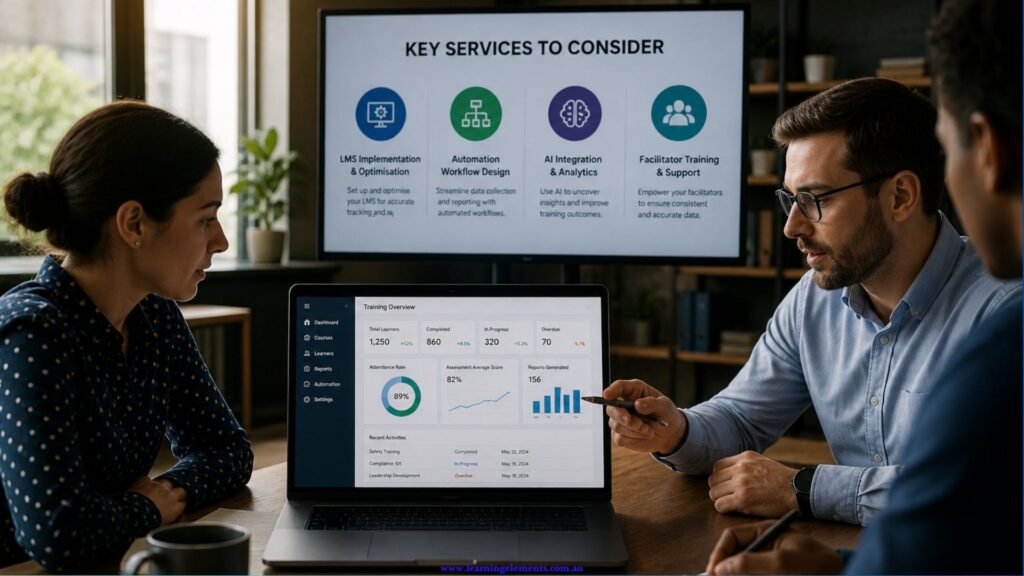
Key Services to Consider When You Automate Training Reporting
To successfully implement automated training reporting, organisations may benefit from the following services:
- LMS implementation and optimisation to ensure systems are configured effectively
- Automation workflow design to streamline data collection and reporting processes
- AI integration for advanced analytics and insight generation
- Facilitator training to ensure consistent and accurate data capture across all training delivery methods
Need support implementing automated training reporting in your organisation?
The Future of Automated Training Reporting
As artificial intelligence (AI) and learning analytics continue to evolve, automated training reporting is becoming increasingly predictive rather than simply reactive.
Modern systems are beginning to provide deeper insights into learner behaviour, engagement patterns, and skill development trends. Instead of only reporting past activity, advanced platforms can now forecast learner risk, recommend personalised interventions, and support data driven workforce planning.
In the future, organisations are likely to rely more heavily on integrated ecosystems that combine LMS platforms, HR systems, performance management tools, and AI powered analytics into a single reporting environment.
This shift will enable Learning and Development teams to move beyond administrative reporting and focus more strategically on learner success, organisational capability building, and long term workforce development.
Conclusion
To automate training reporting successfully, organisations need a thoughtful combination of technology, strategy, and instructional design. Automation not only improves operational efficiency but also enhances the quality and usefulness of data available to decision makers.
By integrating attendance and assessment reporting, applying intelligent analytics, and adopting proactive monitoring strategies, organisations can create a more responsive and effective learning environment that supports both learners and organisational goals.